Moje kocky
Zdrojový kódSource code
ZadarmoFree Bez reklám a sledovaniaNo ads, no tracking Open source · MIT

Tvoja zbierka LEGO® setov. Na tvojom počítači.Your LEGO® set collection. On your own computer.

Evidencia setov a figúrok s cenami, hodnotou a ziskom, skenovaním čiarových kódov a sériami figúrok. Beží ako obyčajný program pre Windows, bez servera a bez účtu v cloude. Údaje ostávajú u teba.Keep track of sets and minifigures with prices, value and profit, barcode scanning and minifigure series. It runs as a normal Windows program, with no server and no cloud account. Your data stays with you.

Stiahnuť pre WindowsDownload for Windows Verzia 1.6.2 · asi 35 MB · Windows 10 a 11 (64‑bit) · inštalácia s právami správcu · Všetky verzie (Releases)Version 1.6.2 · about 35 MB · Windows 10 and 11 (64‑bit) · installs with administrator rights · All versions (Releases) Si na telefóne? Moje kocky bežia len na počítači s Windows. Pošli si odkaz a stiahni si ich tam.On a phone? The app only runs on a Windows computer. Send yourself the link and download it there.
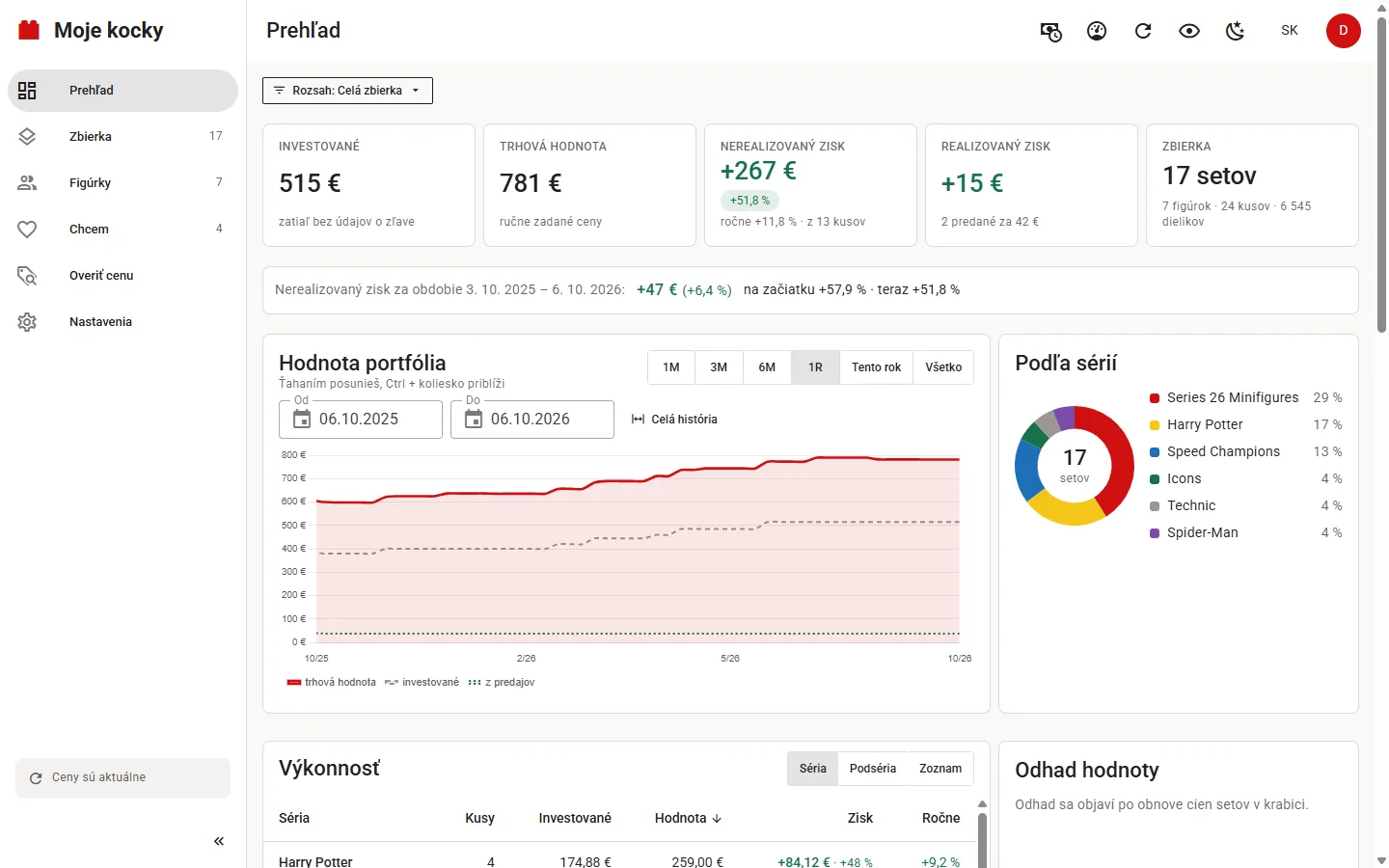
Prehľad: investované, trhová hodnota, zisk, graf hodnoty portfólia a rozdelenie podľa sérií

Nekomerčný projekt fanúšikaA non-commercial fan project

Nič nepredávam, nechcem príspevky, nemám reklamy ani analytiku a tvoje údaje nikam neodchádzajú. Program aj zdrojový kód sú zadarmo pod licenciou MIT. Nie je to produkt LEGO Group ani žiadnej zo služieb nižšie.I sell nothing, take no donations, show no ads, run no analytics, and the app sends your data nowhere. The program and its source code are free under the MIT licence. It is not a product of the LEGO Group or of any of the services below.

Čo Moje kocky vediaWhat it does

Všetko, čo potrebuješ na prehľad o zbierke, bez tabuľky v Exceli.Everything you need to keep on top of your collection, without a spreadsheet.

Ako to vyzeráWhat it looks like

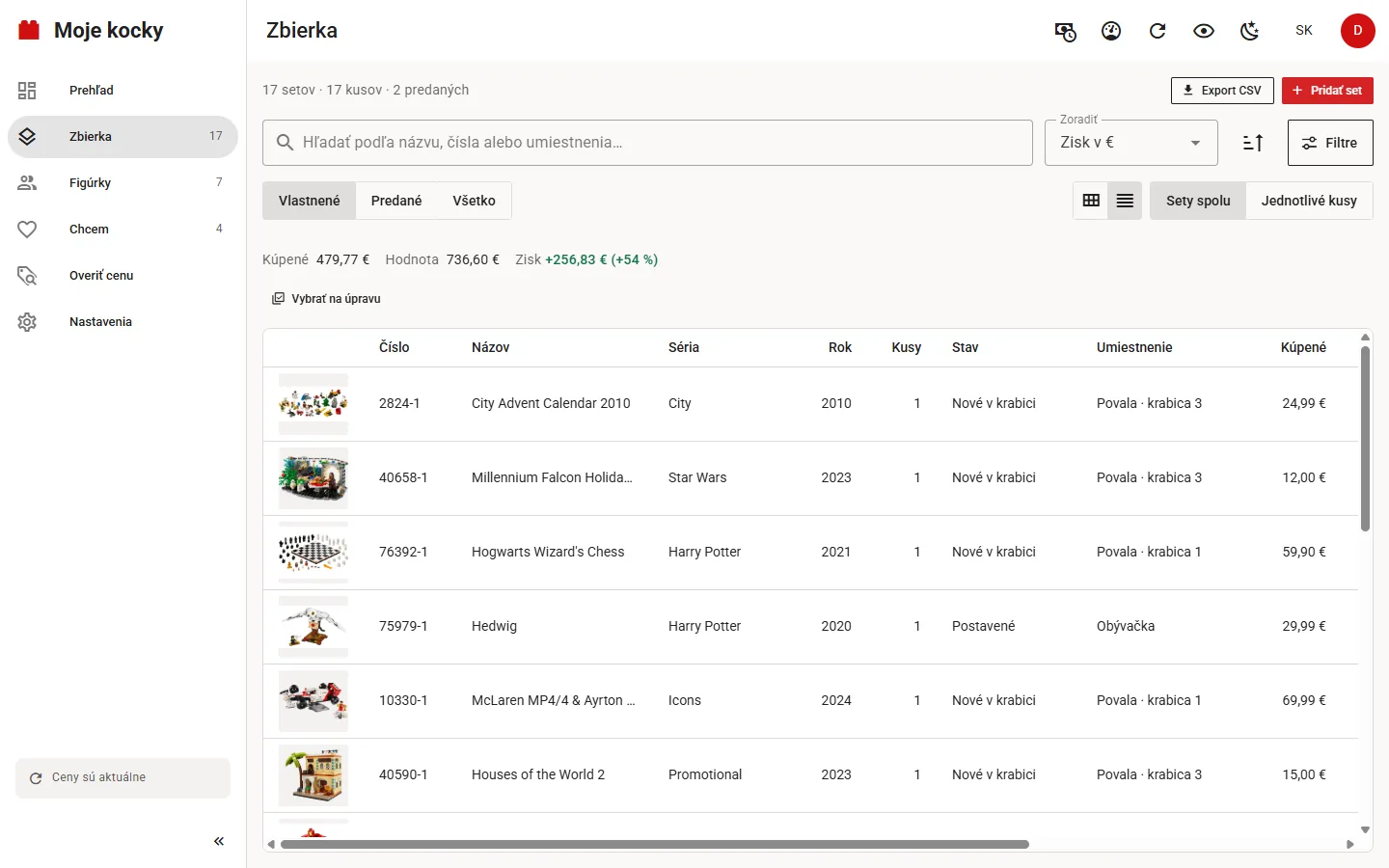
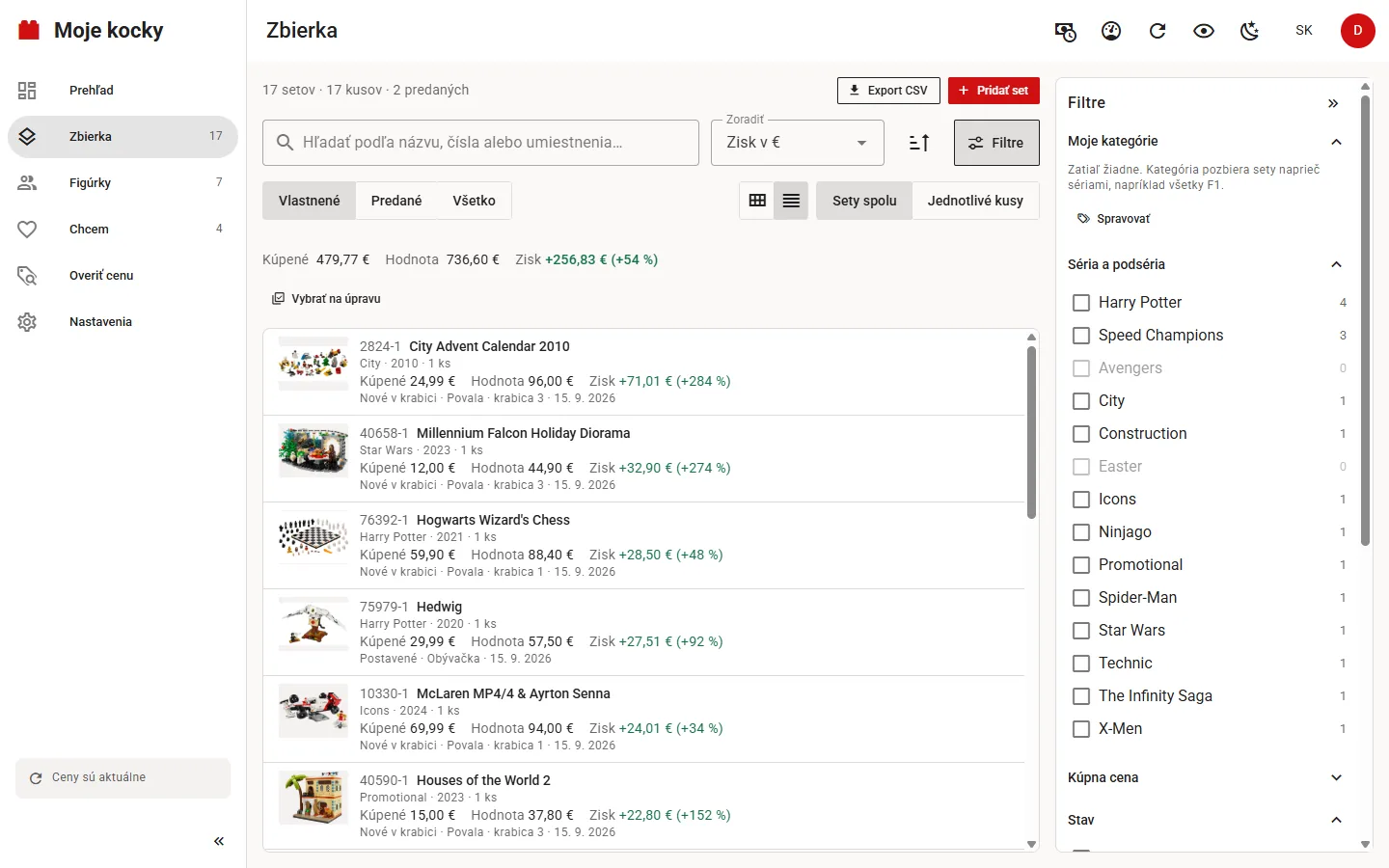
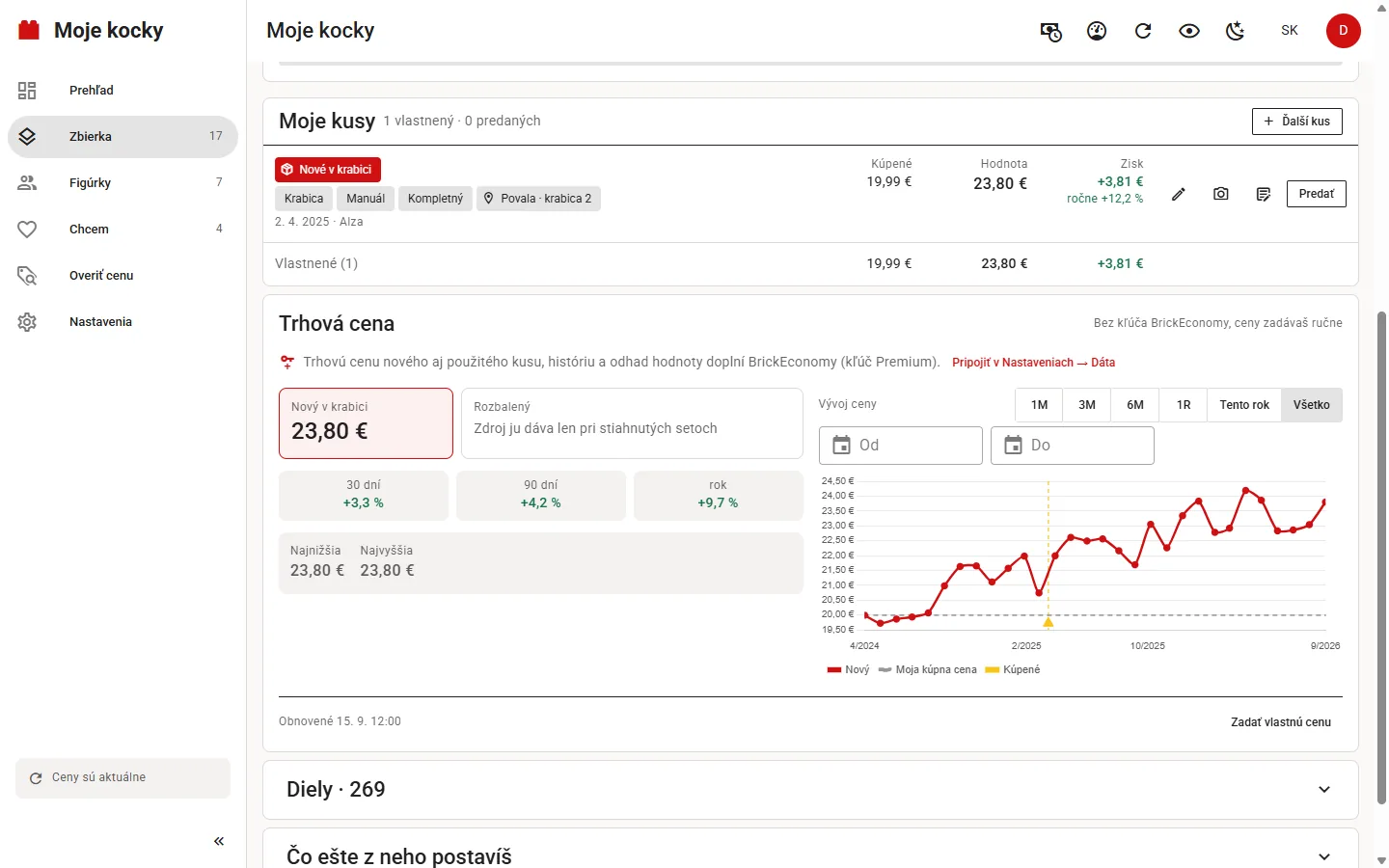
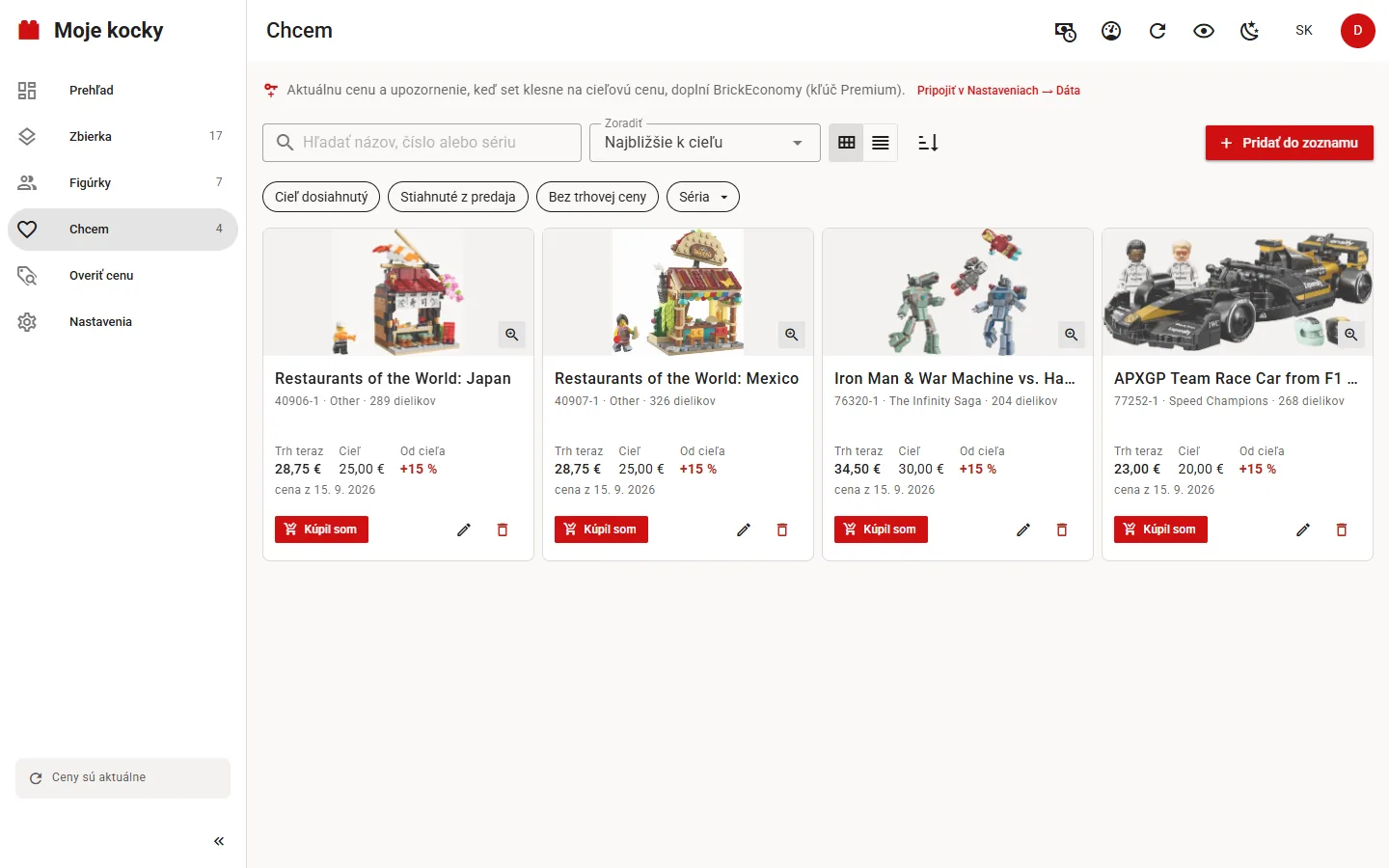
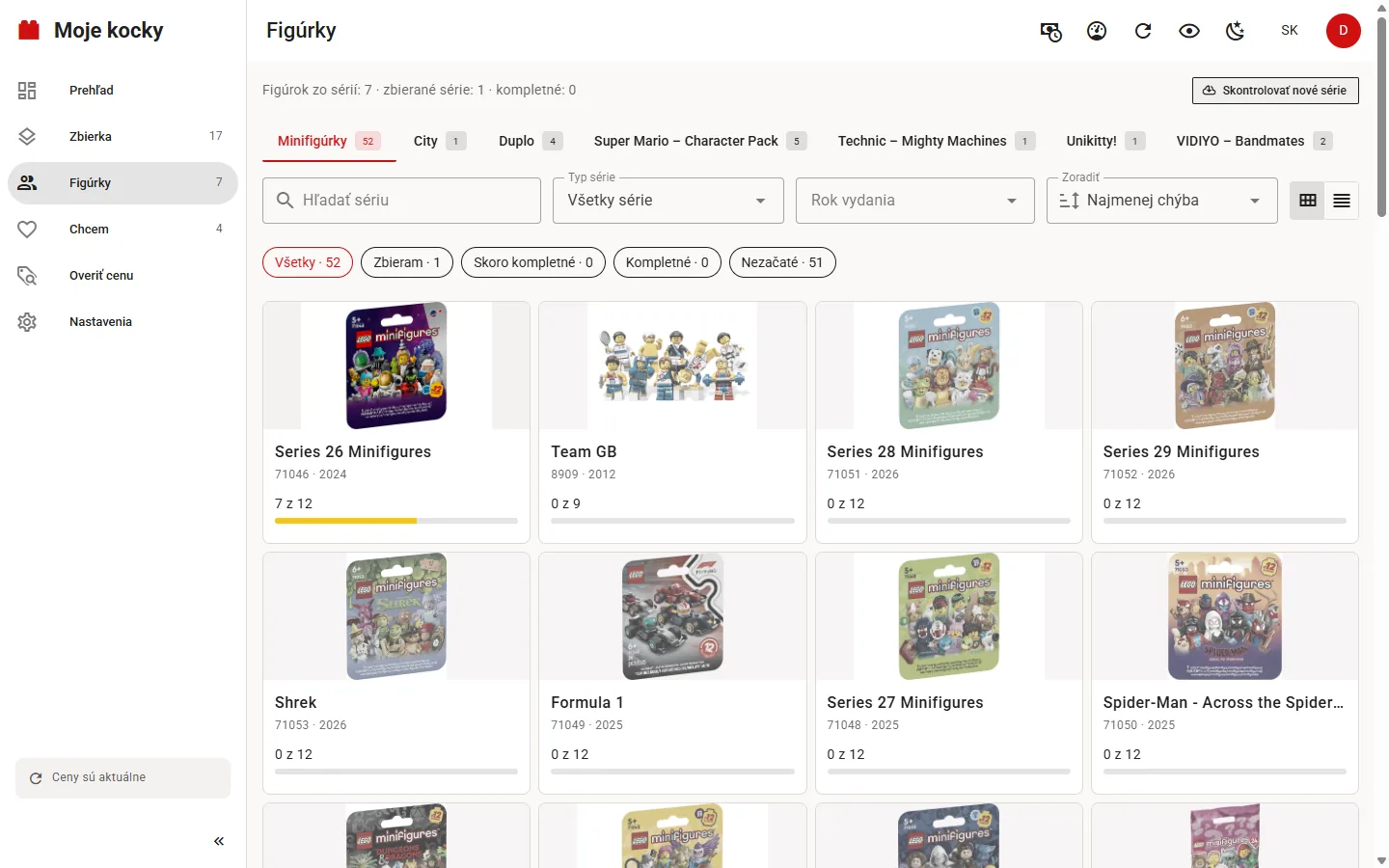
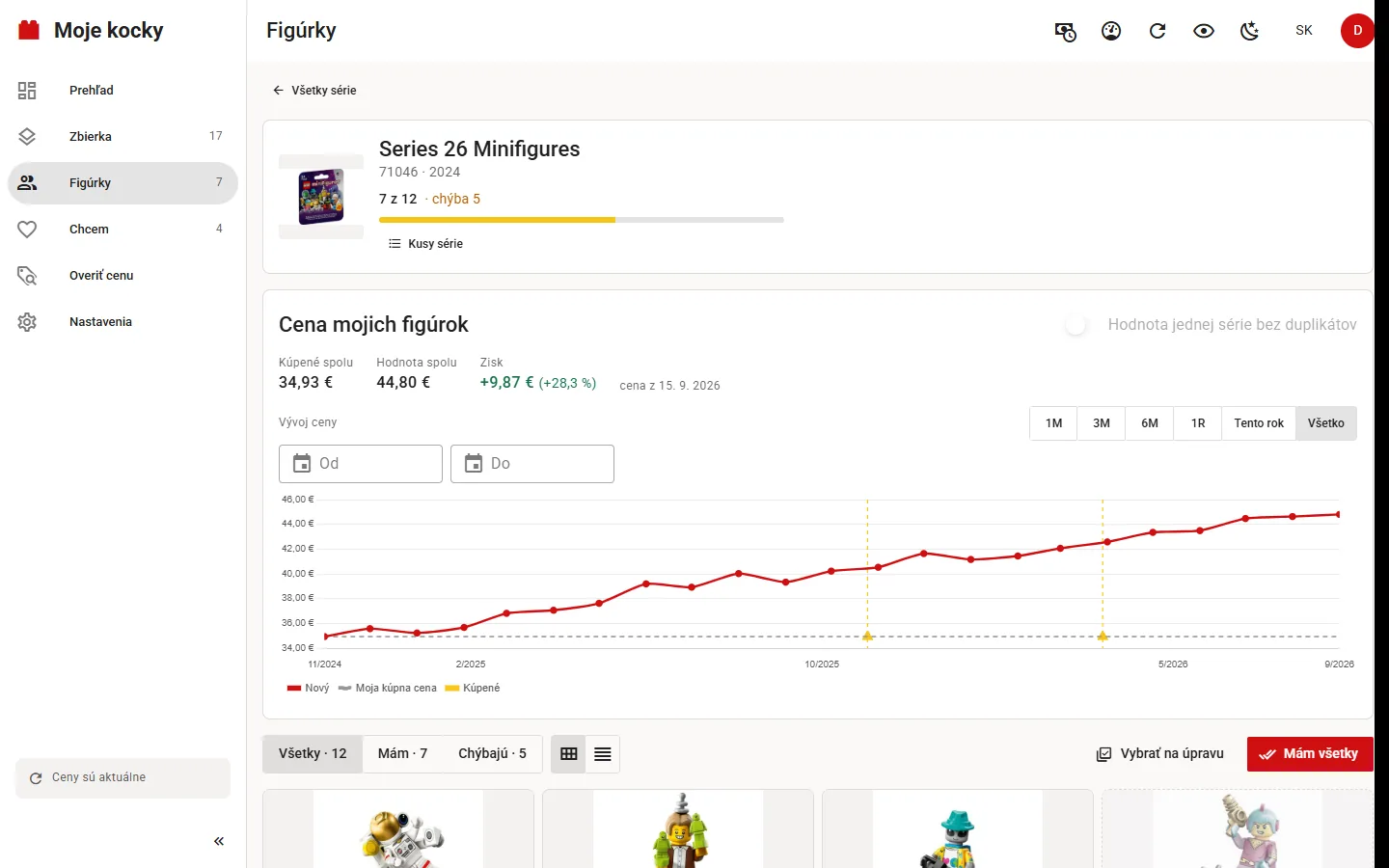
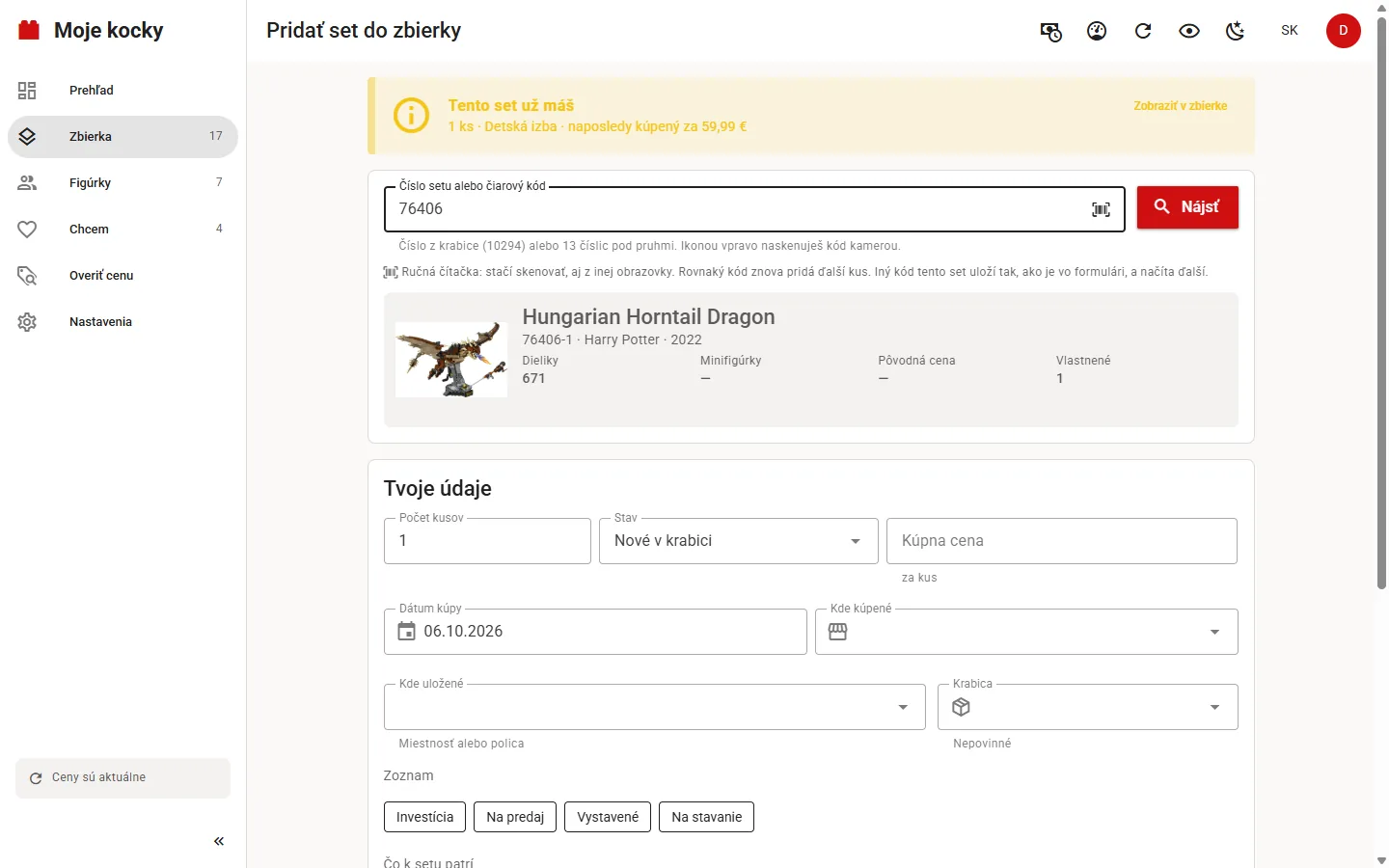
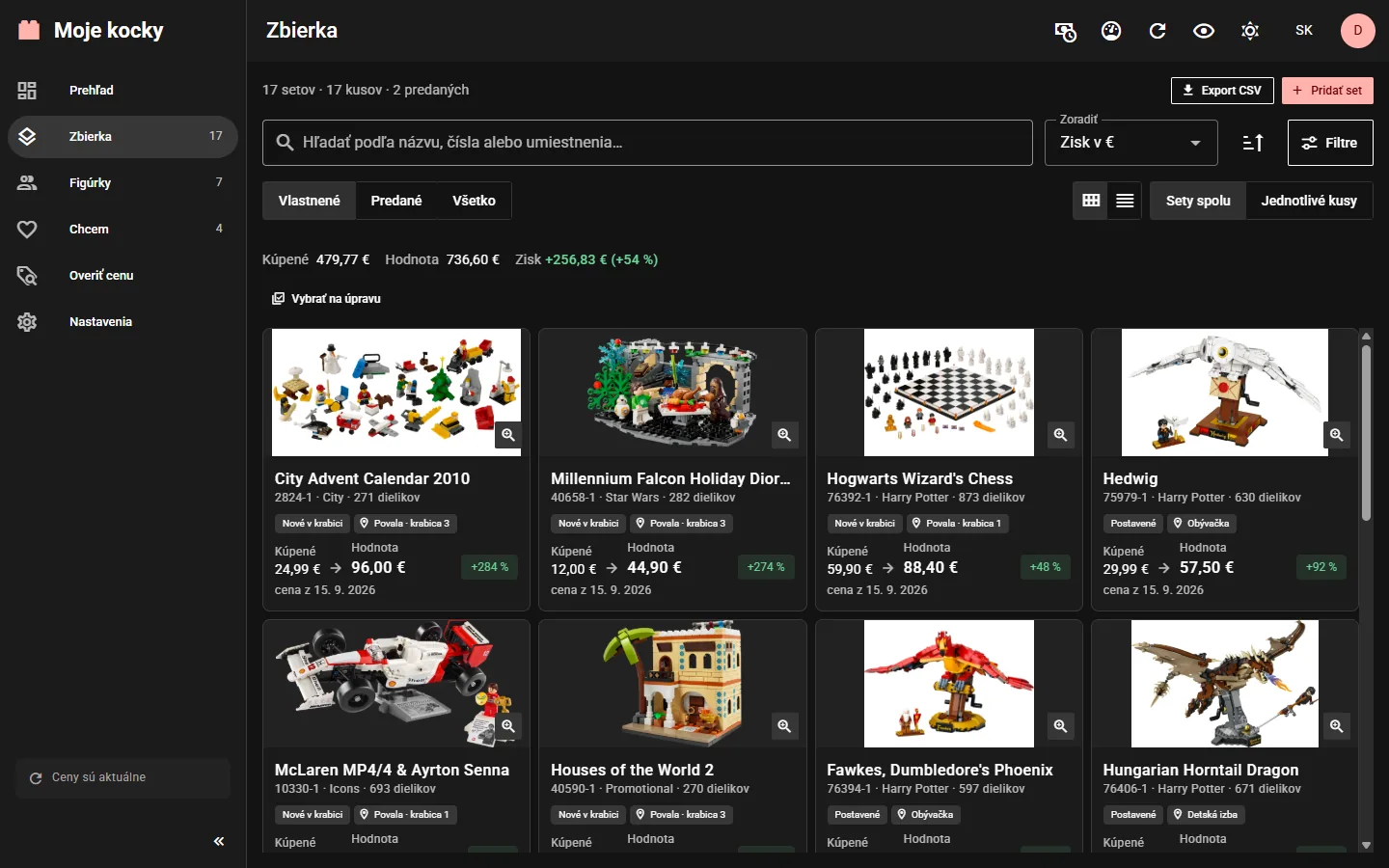
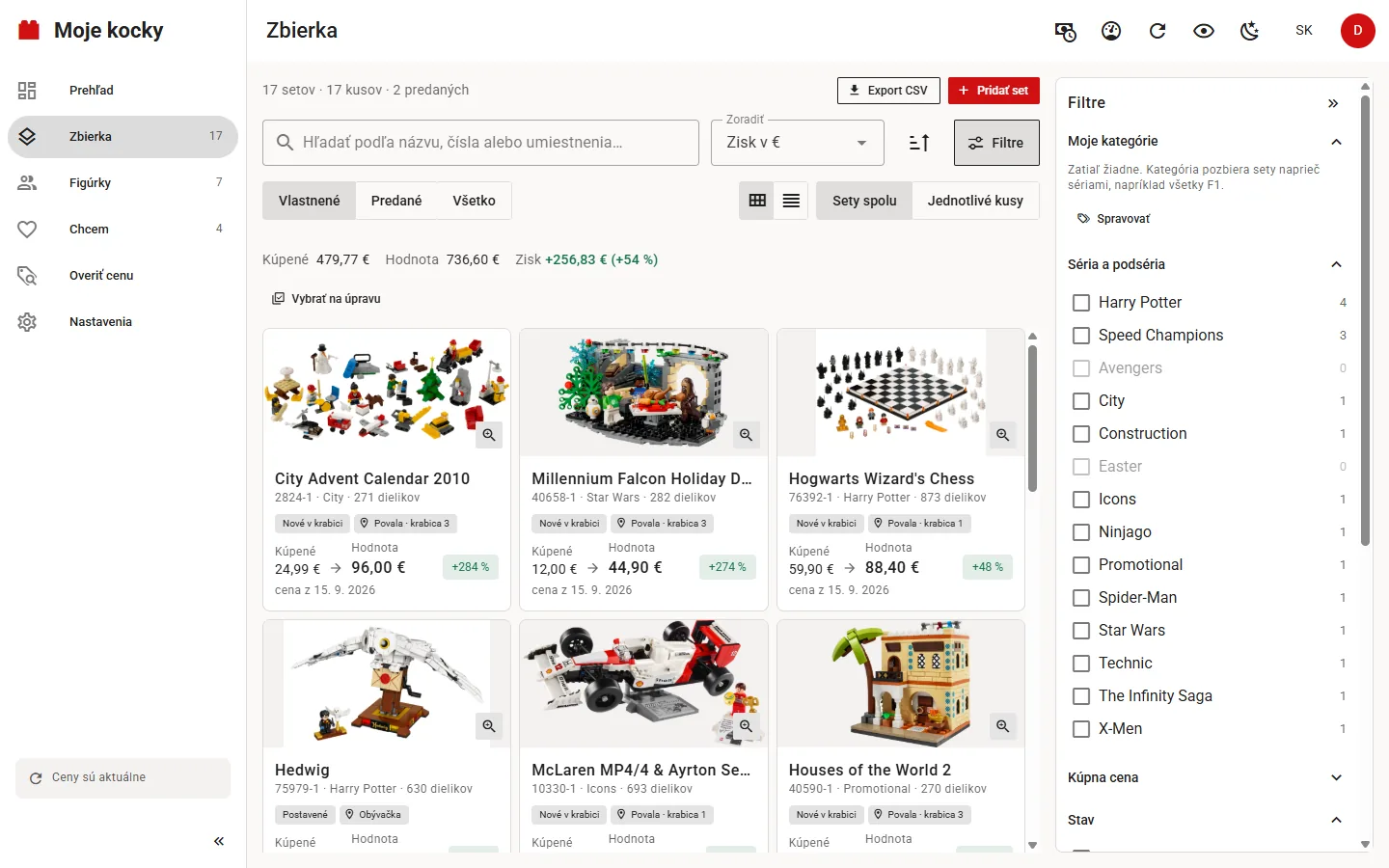
Pás posúvaš do strany; klikni na obrázok a otvorí sa cez celú obrazovku, kde listuješ ďalej. Snímky sú z desktopovej verzie s ukážkovou zbierkou a vymyslenými, ručne zadanými cenami. Ukážkový účet nemá kľúče Brickset ani BrickEconomy, preto miestami vidieť tip, čo by služba doplnila.Scroll the strip sideways; click a picture to open it full screen and keep browsing there. Screenshots come from the desktop version with a sample collection and made-up, manually entered prices. The sample account has no Brickset or BrickEconomy key, so you can see hints of what those services would add.

Inštalácia za minútuInstalled in a minute

Stiahni inštalátorDownload the installer

MojeKocky-Setup-….exe z GitHub Releases. Inštalátor si vypýta práva správcu a program nainštaluje do Program Files pre všetkých používateľov počítača.MojeKocky-Setup-….exe from GitHub Releases. The installer asks for administrator rights and installs the program into Program Files for every user of the PC.

Potvrď otázky WindowsConfirm the Windows prompts

Inštalátor nie je podpísaný platným certifikátom, preto Windows ukáže „Windows chránil tento počítač“. Klikni na Ďalšie informácie → Spustiť aj tak. Potom sa Windows opýta, či inštalátoru povoliť zmeny v zariadení (vydavateľ je neznámy); na bežnom účte zadáš heslo správcu.The installer is not signed with a paid certificate, so Windows shows “Windows protected your PC”. Click More info → Run anyway. Windows then asks whether to let the installer make changes to your device (the publisher shows as unknown); on a standard account you enter an administrator’s password.

Vytvor si účetCreate your account

E-mail, heslo (aspoň 8 znakov) a nepovinné meno, uložené len na tomto počítači. Potom v Nastaveniach → Dáta pripoj služby, ktoré chceš používať.An e-mail, a password (at least 8 characters) and an optional name, stored only on this computer. Then connect the services you want in Settings → Data.

Potrebuje Microsoft Edge WebView2, ktorý vo Windows 10 a 11 býva; ak chýba, inštalátor ponúkne stránku na jeho stiahnutie. Program je v C:\Program Files\MojeKocky pre všetkých používateľov počítača, údaje má každý vlastné v %APPDATA%\MojeKocky; úplná záloha je kópia tohto priečinka. Nová verzia sa nainštaluje cez starú a údaje ostanú; pri jej prvom spustení sa databáza najprv sama zálohuje do %APPDATA%\MojeKocky\backups (drží sa 5 posledných záloh). Staršiu verziu 0.1.x, ktorá bola len pre jedného používateľa v %LOCALAPPDATA%\Programs\MojeKocky, inštalátor sám odstráni a údaje nechá.It needs Microsoft Edge WebView2, which Windows 10 and 11 usually have; if it is missing, the installer offers to open its download page. The program lives in C:\Program Files\MojeKocky for every user of the PC, and each user has their own data in %APPDATA%\MojeKocky; a full backup is a copy of that folder. A new version installs over the old one and keeps your data; the first time it starts, it backs up the database to %APPDATA%\MojeKocky\backups before anything else (the last 5 backups are kept). An older 0.1.x version, which was installed for one user only in %LOCALAPPDATA%\Programs\MojeKocky, is removed by the installer and your data is kept.

Služby pripájaš vlastným kľúčomYou connect services with your own key

Moje kocky nemajú vlastnú databázu setov ani cien. Údaje ťahajú zo služieb nižšie, a to len pod tvojím kľúčom. Kým kľúč nezadáš, zo služby nevidíš nič; pri každej funkcii sa dozvieš, čo by ktorá služba doplnila.The app has no set or price database of its own. It fetches data from the services below, only under your own key. Until you enter a key you see nothing from that service; the app tells you, feature by feature, what each service would add.

SlužbaServiceČo doplníWhat it addsKľúčKey
RebrickableKatalóg setov a minifigúrok, názvy, obrázky, série, zoznam dielikov, alternatívne stavbySet and minifigure catalogue, names, images, themes, parts lists, alternate buildszadarmo, v nastaveniach účtufree, in your account settings
BricksetPôvodné ceny, čiarové kódy, popisy, hodnotenia, vlny sérií, ďalšie fotkyRetail prices, barcodes, descriptions, ratings, theme waves, extra photoszadarmo, na požiadaniefree, on request
BrickEconomyTrhové ceny nových aj použitých kusov, história, odhad hodnotyMarket prices for new and used items, history, value forecastplatené Premium, osobná licenciapaid Premium, personal licence
UPCitemdbZáložné hľadanie setu podľa čiarového kóduFallback lookup of a set by barcodebez kľúča, zapína sa prepínačomno key, switched on in settings
ECBVýmenné kurzy eura na zobrazenie súm v inej mene a kúpu v cudzej meneEuro exchange rates for showing amounts in another currency and buying in a foreign onebez kľúča, len keď zvolíš inú menuno key, only when you pick another currency
EurostatIndex inflácie (HICP Slovensko) na prepočet do dnešných peňazíInflation index (HICP Slovakia) for today’s-money figuresbez kľúča, zapína sa prepínačomno key, switched on in settings

Licencie a podmienky, ktoré Moje kocky dodržiavajúLicences and terms the app follows

Ku každej licencii a podmienkam je tu napísané, ako ich Moje kocky dodržiavajú. Stav k októbru 2026; nie je to právna rada. Texty licencií všetkých knižníc, z ktorých je program poskladaný, pribalí inštalátor (THIRD-PARTY-NOTICES.txt) a sú aj tu.For each licence and set of terms, here is how the app complies. As of October 2026; this is not legal advice. The licence texts of every library the program is built from ship with the installer (THIRD-PARTY-NOTICES.txt) and are also here.

Zdrojový kód programuThe app’s source code

MIT

Môžeš ho používať, upravovať a šíriť, aj ďalej ho dať ľuďom. Licencia MIT sa nevzťahuje na dáta a obrázky zo služieb ani na ochrannú známku LEGO®.You may use, change and share it, and pass it on. The MIT licence does not cover data and images from the services, nor the LEGO® trademark.

LEGO® Fair Play

nekomerčnénon-commercial

Program ani táto stránka nepoužívajú logo LEGO®, nič nepredávajú, slovo LEGO® nemajú v názve ani v adrese a všade nesú upozornenie, že ich LEGO Group nesponzoruje ani neschvaľuje. Obrázky setov sa zobrazujú len na informačné účely.Neither the app nor this site uses the LEGO® logo or sells anything, neither carries LEGO® in its name or address, and both state that the LEGO Group does not sponsor or endorse them. Set images are shown for information only.

Rebrickable API

vlastný kľúčown key

Každý používateľ volá API vlastným kľúčom, v rámci limitov služby. Zdroj je uvedený v programe aj tu.Every user calls the API with their own key, within the service’s limits. The source is credited in the app and here.

Brickset API v3

vlastný kľúčown key

Údaje vidí len účet, ktorý ich stiahol svojím kľúčom. Pri fotkách je „Image(s) courtesy of Brickset.com“. Limity volaní program stráži sám.Data is visible only to the account whose key fetched it. Photos carry “Image(s) courtesy of Brickset.com”. The app keeps within the call limits itself.

BrickEconomy

osobná licenciapersonal licence

Program neobsahuje žiadne ceny BrickEconomy. Vidíš len tie, ktoré stiahol tvoj kľúč Premium, a nikam ďalej sa nešíria. Ceny sú odhady BrickEconomy, nie investičné poradenstvo.The app ships no BrickEconomy prices. You only see those your Premium key fetched, and they go nowhere else. Prices are BrickEconomy estimates, not investment advice.

Európska centrálna bankaEuropean Central Bank

so zdrojomwith source

Zdroj: ECB, referenčné výmenné kurzy eura. Sú len informatívne a stiahnu sa, až keď zvolíš inú menu než euro alebo zadáš kúpu v cudzej mene; o tebe nič neodchádza.Source: ECB, euro foreign exchange reference rates. They are for information only, and the app downloads them only once you pick a currency other than the euro or enter a purchase in a foreign currency; nothing about you is sent.

Eurostat

CC BY 4.0

Zdroj: Eurostat, súbor prc_hicp_minr. Prepočet do dnešných peňazí je úprava dát, za ktorú Eurostat nezodpovedá.Source: Eurostat, dataset prc_hicp_minr. The today’s-money conversion is a modification of the data for which Eurostat is not responsible.

UPCitemdb

bezplatné APIfree API

Predvolene vypnuté. Po zapnutí sa pýta len na čiarový kód. Kód, ktorý sa nenašiel, sa 30 dní nehľadá znova (kým sám nestlačíš Skúsiť znova), nájdený sa už nehľadá vôbec.Off by default. Once enabled, it only asks about a barcode. A code that was not found is not looked up again for 30 days (unless you press Try again yourself); a code that was found is never looked up again.

Súkromie (GDPR)Privacy (GDPR)

len na tvojom PCyour PC only

Program nemá server ani prevádzkovateľa, autor k tvojim údajom nemá prístup. Export všetkých údajov aj zmazanie účtu sú v Nastaveniach; zálohy pri aktualizácii ostávajú na tvojom PC, kým sa neprestriedajú, aj s údajmi zmazaného účtu. Táto stránka nepoužíva cookies, analytiku ani písma či skripty z cudzích serverov; v prehliadači si pamätá len tvoju voľbu svetlého či tmavého režimu.The app has no server and no operator; its author has no access to your data. Exporting all your data and deleting your account are in Settings; update backups stay on your PC until they rotate out, including data of a deleted account. This site uses no cookies, no analytics and no fonts or scripts from third-party servers; your browser only remembers your light or dark mode choice.
Zdrojový kód a webová verziaSource code and the web version

Moje kocky existujú v dvoch podobách s rovnakými funkciami, odkaz na pozretie má len webová. Obe sú otvorené pod licenciou MIT.Moje kocky comes in two forms with the same features, except that only the web version has view-only links. Both are open source under the MIT licence.

Pre WindowsFor Windows

odporúčanérecommended

Tento program. Beží v okne na tvojom počítači (Python a Vue cez pywebview), bez servera a bez otvoreného portu. Inštaluje sa s právami správcu do Program Files pre všetkých používateľov počítača, údaje má každý vlastné. Inštalátor sa zostavuje z repozitára moje-kocky-desktop a na GitHube ho pri každom vydaní vyrobí automatické zostavenie.This program. The app runs in a window on your computer (Python and Vue via pywebview), with no server and no open port. It installs with administrator rights into Program Files for every user of the PC, and each user has their own data. The installer is built from the moje-kocky-desktop repository, and GitHub builds it automatically for every release.

GitHub · moje-kocky-desktop

Webová verzia na vlastný serverWeb version for your own server

pre pokročilýchfor advanced users

Ten istý program ako webová služba, ktorú si spustíš cez Docker na svojom serveri alebo NAS. Hodí sa, keď chceš zbierku otvárať z telefónu či viacerých počítačov alebo ju niekomu ukázať cez odkaz na pozretie (celú zbierku alebo zoznam Chcem, so sumami alebo bez nich).The same app as a web service you run with Docker on your own server or NAS. Useful when you want to open your collection from a phone or several computers, or show it to someone through a view-only link (the whole collection or the wishlist, with or without amounts).

  • Hostovanú verziu neprevádzkujem. Server, aktualizácie a zálohy priečinka data/ sú na tebe. Pri prvom štarte novej verzie sa databáza najprv sama skopíruje do data/backups, fotky nie.I do not run a hosted version. The server, updates and backups of the data/ folder are up to you. The first time a new version starts, it copies the database to data/backups first (photos are not included).
  • Kamera na skenovanie ide len cez HTTPS alebo na localhost.The scanning camera only works over HTTPS or on localhost.
  • Keď webovú verziu otvoríš iným ľuďom, stávaš sa prevádzkovateľom podľa GDPR: v Nastaveniach → Aplikácia vyplníš kontakt do zásad ochrany súkromia. Kľúče k službám si aj tak každý zadáva vlastné.If you open the app to other people, you become the data controller under GDPR: you fill in your contact for the privacy notice in the app. Everyone still enters their own service keys.
GitHub · moje-kocky-webapp

Časté otázkyQuestions

Windows píše, že nemôže získať prístup k súboruWindows says it cannot access the file

Program zablokoval antivírus, ktorý nepodpísané programy občas označí omylom. V Zabezpečení Windows → História ochrany daj Povoliť v zariadení a inštalátor spusti znova.Your antivirus blocked it; unsigned programs sometimes get flagged by mistake. In Windows Security → Protection history choose Allow on device and run the installer again.

Musím mať všetky kľúče?Do I need every key?

Nie. Bez kľúčov je to evidencia s ručne zadanými údajmi. Rebrickable a Brickset sú zadarmo, BrickEconomy potrebuješ len na trhové ceny.No. Without keys it is a catalogue with data you enter yourself. Rebrickable and Brickset are free; BrickEconomy is only needed for market prices.

Môže program používať viac ľudí?Can several people use it?

Áno. Program je nainštalovaný pre všetkých používateľov Windows na počítači a každý má vlastné údaje. Aj pod jedným používateľom Windows môže mať program viac účtov s heslom; ďalšie účty povolí prvý účet (správca) v Nastaveniach → Aplikácia. Každý ďalší používateľ Windows si prvý účet vo svojich údajoch založí sám.Yes. The program is installed for every Windows user on the PC and each has their own data. Even under one Windows user the app can have several accounts with passwords; the first account (the app's administrator) allows more in Settings → Application. Every other Windows user creates their own first account in their own data.

Ako prenesiem zbierku na iný počítač?How do I move my collection to another PC?

Skopíruj priečinok %APPDATA%\MojeKocky pred prvým spustením, alebo použi export a import v Nastaveniach.Copy the %APPDATA%\MojeKocky folder before the first start, or use export and import in Settings.

Čo sa stane s mojimi údajmi pri novej verzii?What happens to my data when I update?

Stačí spustiť nový inštalátor, nainštaluje sa cez starú verziu. Prepíše sa len program, údaje v %APPDATA%\MojeKocky ostanú. Pri prvom spustení novej verzie sa databáza najprv zálohuje do priečinka backups (5 posledných). Keby aktualizácia zlyhala, okno povie, kde je záloha a ako sa vrátiť. Pri prechode zo staršej verzie 0.1.x, ktorá bola len pre jedného používateľa, inštalátor jej inštaláciu v AppData odstráni sám, údaje ostanú; keď ešte beží, povie „Zavri Moje kocky a spusti inštaláciu znova.“ Odinštalovanie sa opýta, či zmazať aj údaje účtu Windows, pod ktorým po otázke UAC beží, a menuje ho (predvolene nie). Keď na bežnom účte zadáš heslo iného účtu správcu, nezmaže nič a svoj priečinok %APPDATA%\MojeKocky zmažeš sám.Just run the new installer; it installs over the old version. Only the program is replaced, your data in %APPDATA%\MojeKocky stays. The first time the new version starts, it backs up the database to the backups folder (the last 5 are kept). If the update fails, a window tells you where the backup is and how to go back. When you update from an older 0.1.x version, which was installed for one user only, the installer removes its install in AppData itself and your data stays; if it is still running, the installer asks you (in Slovak) to close Moje kocky and run it again. Uninstalling asks whether to delete the data of the Windows account it runs as after the UAC prompt, and names that account (the default is no). If you enter a different administrator's password on a standard account, it deletes nothing and you delete your own %APPDATA%\MojeKocky folder yourself.

Akú verziu mám?Which version do I have?

Ukáže ju Nastavenia → Aplikácia (vidí ju prvý účet, správca) aj zoznam nainštalovaných aplikácií vo Windows. Najnovšia je vždy na GitHub Releases.Settings → Application shows it (visible to the first account, the administrator), and so does the list of installed apps in Windows. The latest one is always on GitHub Releases.